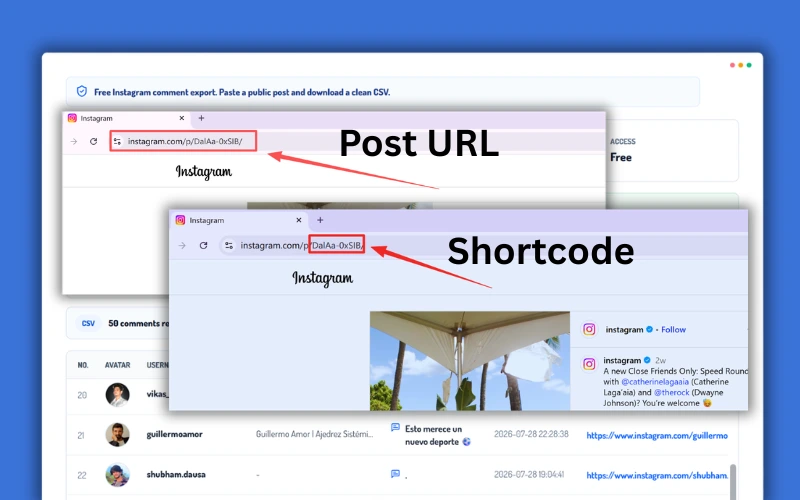
 1
1Paste the URL or Shortcode
Paste a public Instagram Post or Reel URL, or enter its shortcode.
The downloaded CSV contains the complete available comment list from the selected Instagram Post or Reel.
AvatarCommenter's public profile photo
UsernameInstagram account username
Full NamePublic profile display name
CommentComplete comment text, including emojis
Created AtDate and time the comment was posted
Profile URLDirect link to the commenter's public profile
| No. | Avatar | Username | Full name | Comment | Created at | Profile URL | |
|---|---|---|---|---|---|---|---|
| 1 | %22%2F%3E%0A%20%20%20%20%20%20%3Ctext%20x%3D%2236%22%20y%3D%2242%22%20text-anchor%3D%22middle%22%20font-family%3D%22Inter%2C%20Arial%2C%20sans-serif%22%20font-size%3D%2220%22%20font-weight%3D%22800%22%20fill%3D%22hsl(47%2048%25%2034%25)%22%3E1%3C%2Ftext%3E%0A%20%20%20%20%3C%2Fsvg%3E) | maya.builds | Maya Bennett | This is exactly the workflow our campaign team has been looking for. | 0 | 2026-07-28 09:00 | https://www.instagram.com/maya.builds/ |
| 2 | %22%2F%3E%0A%20%20%20%20%20%20%3Ctext%20x%3D%2236%22%20y%3D%2242%22%20text-anchor%3D%22middle%22%20font-family%3D%22Inter%2C%20Arial%2C%20sans-serif%22%20font-size%3D%2220%22%20font-weight%3D%22800%22%20fill%3D%22hsl(94%2048%25%2034%25)%22%3E2%3C%2Ftext%3E%0A%20%20%20%20%3C%2Fsvg%3E) | growthwithleo | Leo Martinez | Does this work with Reels too? The examples look really useful. | 0 | 2026-07-27 10:07 | https://www.instagram.com/growthwithleo/ |
| 3 | %22%2F%3E%0A%20%20%20%20%20%20%3Ctext%20x%3D%2236%22%20y%3D%2242%22%20text-anchor%3D%22middle%22%20font-family%3D%22Inter%2C%20Arial%2C%20sans-serif%22%20font-size%3D%2220%22%20font-weight%3D%22800%22%20fill%3D%22hsl(141%2048%25%2034%25)%22%3E3%3C%2Ftext%3E%0A%20%20%20%20%3C%2Fsvg%3E) | studio.alina | Alina Brooks | Love how clearly the process is explained. Saving this for our next launch. | 0 | 2026-07-26 11:14 | https://www.instagram.com/studio.alina/ |
| 4 | %22%2F%3E%0A%20%20%20%20%20%20%3Ctext%20x%3D%2236%22%20y%3D%2242%22%20text-anchor%3D%22middle%22%20font-family%3D%22Inter%2C%20Arial%2C%20sans-serif%22%20font-size%3D%2220%22%20font-weight%3D%22800%22%20fill%3D%22hsl(188%2048%25%2034%25)%22%3E4%3C%2Ftext%3E%0A%20%20%20%20%3C%2Fsvg%3E) | samir.creates | Samir Khan | The profile URL in each row will make creator research much faster. | 0 | 2026-07-25 12:21 | https://www.instagram.com/samir.creates/ |
| 5 | %22%2F%3E%0A%20%20%20%20%20%20%3Ctext%20x%3D%2236%22%20y%3D%2242%22%20text-anchor%3D%22middle%22%20font-family%3D%22Inter%2C%20Arial%2C%20sans-serif%22%20font-size%3D%2220%22%20font-weight%3D%22800%22%20fill%3D%22hsl(235%2048%25%2034%25)%22%3E5%3C%2Ftext%3E%0A%20%20%20%20%3C%2Fsvg%3E) | nora.analytics | Nora Fields | We have been doing this manually for months. This would save hours. | 0 | 2026-07-24 13:28 | https://www.instagram.com/nora.analytics/ |
| 6 | %22%2F%3E%0A%20%20%20%20%20%20%3Ctext%20x%3D%2236%22%20y%3D%2242%22%20text-anchor%3D%22middle%22%20font-family%3D%22Inter%2C%20Arial%2C%20sans-serif%22%20font-size%3D%2220%22%20font-weight%3D%22800%22%20fill%3D%22hsl(282%2048%25%2034%25)%22%3E6%3C%2Ftext%3E%0A%20%20%20%20%3C%2Fsvg%3E) | thebranddesk | Olivia Reed | Could this be used to review giveaway entries across several posts? | 0 | 2026-07-23 14:35 | https://www.instagram.com/thebranddesk/ |
| 7 | %22%2F%3E%0A%20%20%20%20%20%20%3Ctext%20x%3D%2236%22%20y%3D%2242%22%20text-anchor%3D%22middle%22%20font-family%3D%22Inter%2C%20Arial%2C%20sans-serif%22%20font-size%3D%2220%22%20font-weight%3D%22800%22%20fill%3D%22hsl(329%2048%25%2034%25)%22%3E7%3C%2Ftext%3E%0A%20%20%20%20%3C%2Fsvg%3E) | kevin.social | Kevin Tran | The CSV format is perfect for the report I build in Sheets every week. | 0 | 2026-07-28 15:42 | https://www.instagram.com/kevin.social/ |
| 8 | %22%2F%3E%0A%20%20%20%20%20%20%3Ctext%20x%3D%2236%22%20y%3D%2242%22%20text-anchor%3D%22middle%22%20font-family%3D%22Inter%2C%20Arial%2C%20sans-serif%22%20font-size%3D%2220%22%20font-weight%3D%22800%22%20fill%3D%22hsl(16%2048%25%2034%25)%22%3E8%3C%2Ftext%3E%0A%20%20%20%20%3C%2Fsvg%3E) | communitybyjess | Jessica Moore | No Instagram login is a major plus for client research. | 0 | 2026-07-27 16:49 | https://www.instagram.com/communitybyjess/ |
| 9 | %22%2F%3E%0A%20%20%20%20%20%20%3Ctext%20x%3D%2236%22%20y%3D%2242%22%20text-anchor%3D%22middle%22%20font-family%3D%22Inter%2C%20Arial%2C%20sans-serif%22%20font-size%3D%2220%22%20font-weight%3D%22800%22%20fill%3D%22hsl(63%2048%25%2034%25)%22%3E9%3C%2Ftext%3E%0A%20%20%20%20%3C%2Fsvg%3E) | david.launches | David Kim | Great resource. I can already see several audience research use cases. | 0 | 2026-07-26 17:56 | https://www.instagram.com/david.launches/ |
| 10 | %22%2F%3E%0A%20%20%20%20%20%20%3Ctext%20x%3D%2236%22%20y%3D%2242%22%20text-anchor%3D%22middle%22%20font-family%3D%22Inter%2C%20Arial%2C%20sans-serif%22%20font-size%3D%2220%22%20font-weight%3D%22800%22%20fill%3D%22hsl(110%2048%25%2034%25)%22%3E10%3C%2Ftext%3E%0A%20%20%20%20%3C%2Fsvg%3E) | elena.market | Elena Rossi | Being able to keep the comment beside the username is the key feature for us. | 0 | 2026-07-25 18:03 | https://www.instagram.com/elena.market/ |
| 11 | %22%2F%3E%0A%20%20%20%20%20%20%3Ctext%20x%3D%2236%22%20y%3D%2242%22%20text-anchor%3D%22middle%22%20font-family%3D%22Inter%2C%20Arial%2C%20sans-serif%22%20font-size%3D%2220%22%20font-weight%3D%22800%22%20fill%3D%22hsl(157%2048%25%2034%25)%22%3E11%3C%2Ftext%3E%0A%20%20%20%20%3C%2Fsvg%3E) | chrismakesmedia | Chris Walker | This would make competitor analysis much easier to organize. | 0 | 2026-07-24 09:10 | https://www.instagram.com/chrismakesmedia/ |
| 12 | %22%2F%3E%0A%20%20%20%20%20%20%3Ctext%20x%3D%2236%22%20y%3D%2242%22%20text-anchor%3D%22middle%22%20font-family%3D%22Inter%2C%20Arial%2C%20sans-serif%22%20font-size%3D%2220%22%20font-weight%3D%22800%22%20fill%3D%22hsl(204%2048%25%2034%25)%22%3E12%3C%2Ftext%3E%0A%20%20%20%20%3C%2Fsvg%3E) | amanda.strategy | Amanda Lee | Can the exported time field be sorted directly in Excel? | 0 | 2026-07-23 10:17 | https://www.instagram.com/amanda.strategy/ |
| 13 | %22%2F%3E%0A%20%20%20%20%20%20%3Ctext%20x%3D%2236%22%20y%3D%2242%22%20text-anchor%3D%22middle%22%20font-family%3D%22Inter%2C%20Arial%2C%20sans-serif%22%20font-size%3D%2220%22%20font-weight%3D%22800%22%20fill%3D%22hsl(251%2048%25%2034%25)%22%3E13%3C%2Ftext%3E%0A%20%20%20%20%3C%2Fsvg%3E) | joel.ecommerce | Joel Carter | The preview is helpful before committing the data to a campaign report. | 0 | 2026-07-28 11:24 | https://www.instagram.com/joel.ecommerce/ |
| 14 | %22%2F%3E%0A%20%20%20%20%20%20%3Ctext%20x%3D%2236%22%20y%3D%2242%22%20text-anchor%3D%22middle%22%20font-family%3D%22Inter%2C%20Arial%2C%20sans-serif%22%20font-size%3D%2220%22%20font-weight%3D%22800%22%20fill%3D%22hsl(298%2048%25%2034%25)%22%3E14%3C%2Ftext%3E%0A%20%20%20%20%3C%2Fsvg%3E) | sophie.content | Sophie Martin | We need this for community questions after product announcements. | 0 | 2026-07-27 12:31 | https://www.instagram.com/sophie.content/ |
| 15 | %22%2F%3E%0A%20%20%20%20%20%20%3Ctext%20x%3D%2236%22%20y%3D%2242%22%20text-anchor%3D%22middle%22%20font-family%3D%22Inter%2C%20Arial%2C%20sans-serif%22%20font-size%3D%2220%22%20font-weight%3D%22800%22%20fill%3D%22hsl(345%2048%25%2034%25)%22%3E15%3C%2Ftext%3E%0A%20%20%20%20%3C%2Fsvg%3E) | marcus.digital | Marcus Young | Clean data and direct profile links are exactly what an agency needs. | 0 | 2026-07-26 13:38 | https://www.instagram.com/marcus.digital/ |
| 16 | %22%2F%3E%0A%20%20%20%20%20%20%3Ctext%20x%3D%2236%22%20y%3D%2242%22%20text-anchor%3D%22middle%22%20font-family%3D%22Inter%2C%20Arial%2C%20sans-serif%22%20font-size%3D%2220%22%20font-weight%3D%22800%22%20fill%3D%22hsl(32%2048%25%2034%25)%22%3E16%3C%2Ftext%3E%0A%20%20%20%20%3C%2Fsvg%3E) | rachel.research | Rachel Adams | I would use this to spot repeated product questions and objections. | 0 | 2026-07-25 14:45 | https://www.instagram.com/rachel.research/ |
| 17 | %22%2F%3E%0A%20%20%20%20%20%20%3Ctext%20x%3D%2236%22%20y%3D%2242%22%20text-anchor%3D%22middle%22%20font-family%3D%22Inter%2C%20Arial%2C%20sans-serif%22%20font-size%3D%2220%22%20font-weight%3D%22800%22%20fill%3D%22hsl(79%2048%25%2034%25)%22%3E17%3C%2Ftext%3E%0A%20%20%20%20%3C%2Fsvg%3E) | ben.creatorlab | Ben Harris | Very practical for creator shortlisting and engagement checks. | 0 | 2026-07-24 15:52 | https://www.instagram.com/ben.creatorlab/ |
| 18 | %22%2F%3E%0A%20%20%20%20%20%20%3Ctext%20x%3D%2236%22%20y%3D%2242%22%20text-anchor%3D%22middle%22%20font-family%3D%22Inter%2C%20Arial%2C%20sans-serif%22%20font-size%3D%2220%22%20font-weight%3D%22800%22%20fill%3D%22hsl(126%2048%25%2034%25)%22%3E18%3C%2Ftext%3E%0A%20%20%20%20%3C%2Fsvg%3E) | isabel.community | Isabel Garcia | The batch workflow sounds useful when several client posts go live together. | 0 | 2026-07-23 16:59 | https://www.instagram.com/isabel.community/ |
| 19 | %22%2F%3E%0A%20%20%20%20%20%20%3Ctext%20x%3D%2236%22%20y%3D%2242%22%20text-anchor%3D%22middle%22%20font-family%3D%22Inter%2C%20Arial%2C%20sans-serif%22%20font-size%3D%2220%22%20font-weight%3D%22800%22%20fill%3D%22hsl(173%2048%25%2034%25)%22%3E19%3C%2Ftext%3E%0A%20%20%20%20%3C%2Fsvg%3E) | noah.growth | Noah Wilson | Finally a cleaner way to archive useful comments after a launch. | 0 | 2026-07-28 17:06 | https://www.instagram.com/noah.growth/ |
| 20 | %22%2F%3E%0A%20%20%20%20%20%20%3Ctext%20x%3D%2236%22%20y%3D%2242%22%20text-anchor%3D%22middle%22%20font-family%3D%22Inter%2C%20Arial%2C%20sans-serif%22%20font-size%3D%2220%22%20font-weight%3D%22800%22%20fill%3D%22hsl(220%2048%25%2034%25)%22%3E20%3C%2Ftext%3E%0A%20%20%20%20%3C%2Fsvg%3E) | talia.social | Talia Lewis | This is going into our social research toolkit today. | 0 | 2026-07-27 18:13 | https://www.instagram.com/talia.social/ |
| 21 | %22%2F%3E%0A%20%20%20%20%20%20%3Ctext%20x%3D%2236%22%20y%3D%2242%22%20text-anchor%3D%22middle%22%20font-family%3D%22Inter%2C%20Arial%2C%20sans-serif%22%20font-size%3D%2220%22%20font-weight%3D%22800%22%20fill%3D%22hsl(267%2048%25%2034%25)%22%3E21%3C%2Ftext%3E%0A%20%20%20%20%3C%2Fsvg%3E) | maya.builds | Maya Bennett | This is exactly the workflow our campaign team has been looking for. | 0 | 2026-07-26 09:20 | https://www.instagram.com/maya.builds/ |
| 22 | %22%2F%3E%0A%20%20%20%20%20%20%3Ctext%20x%3D%2236%22%20y%3D%2242%22%20text-anchor%3D%22middle%22%20font-family%3D%22Inter%2C%20Arial%2C%20sans-serif%22%20font-size%3D%2220%22%20font-weight%3D%22800%22%20fill%3D%22hsl(314%2048%25%2034%25)%22%3E22%3C%2Ftext%3E%0A%20%20%20%20%3C%2Fsvg%3E) | growthwithleo | Leo Martinez | Does this work with Reels too? The examples look really useful. | 0 | 2026-07-25 10:27 | https://www.instagram.com/growthwithleo/ |
| 23 | %22%2F%3E%0A%20%20%20%20%20%20%3Ctext%20x%3D%2236%22%20y%3D%2242%22%20text-anchor%3D%22middle%22%20font-family%3D%22Inter%2C%20Arial%2C%20sans-serif%22%20font-size%3D%2220%22%20font-weight%3D%22800%22%20fill%3D%22hsl(1%2048%25%2034%25)%22%3E23%3C%2Ftext%3E%0A%20%20%20%20%3C%2Fsvg%3E) | studio.alina | Alina Brooks | Love how clearly the process is explained. Saving this for our next launch. | 0 | 2026-07-24 11:34 | https://www.instagram.com/studio.alina/ |
| 24 | %22%2F%3E%0A%20%20%20%20%20%20%3Ctext%20x%3D%2236%22%20y%3D%2242%22%20text-anchor%3D%22middle%22%20font-family%3D%22Inter%2C%20Arial%2C%20sans-serif%22%20font-size%3D%2220%22%20font-weight%3D%22800%22%20fill%3D%22hsl(48%2048%25%2034%25)%22%3E24%3C%2Ftext%3E%0A%20%20%20%20%3C%2Fsvg%3E) | samir.creates | Samir Khan | The profile URL in each row will make creator research much faster. | 0 | 2026-07-23 12:41 | https://www.instagram.com/samir.creates/ |
| 25 | %22%2F%3E%0A%20%20%20%20%20%20%3Ctext%20x%3D%2236%22%20y%3D%2242%22%20text-anchor%3D%22middle%22%20font-family%3D%22Inter%2C%20Arial%2C%20sans-serif%22%20font-size%3D%2220%22%20font-weight%3D%22800%22%20fill%3D%22hsl(95%2048%25%2034%25)%22%3E25%3C%2Ftext%3E%0A%20%20%20%20%3C%2Fsvg%3E) | nora.analytics | Nora Fields | We have been doing this manually for months. This would save hours. | 0 | 2026-07-28 13:48 | https://www.instagram.com/nora.analytics/ |
| 26 | %22%2F%3E%0A%20%20%20%20%20%20%3Ctext%20x%3D%2236%22%20y%3D%2242%22%20text-anchor%3D%22middle%22%20font-family%3D%22Inter%2C%20Arial%2C%20sans-serif%22%20font-size%3D%2220%22%20font-weight%3D%22800%22%20fill%3D%22hsl(142%2048%25%2034%25)%22%3E26%3C%2Ftext%3E%0A%20%20%20%20%3C%2Fsvg%3E) | thebranddesk | Olivia Reed | Could this be used to review giveaway entries across several posts? | 0 | 2026-07-27 14:55 | https://www.instagram.com/thebranddesk/ |
| 27 | %22%2F%3E%0A%20%20%20%20%20%20%3Ctext%20x%3D%2236%22%20y%3D%2242%22%20text-anchor%3D%22middle%22%20font-family%3D%22Inter%2C%20Arial%2C%20sans-serif%22%20font-size%3D%2220%22%20font-weight%3D%22800%22%20fill%3D%22hsl(189%2048%25%2034%25)%22%3E27%3C%2Ftext%3E%0A%20%20%20%20%3C%2Fsvg%3E) | kevin.social | Kevin Tran | The CSV format is perfect for the report I build in Sheets every week. | 0 | 2026-07-26 15:02 | https://www.instagram.com/kevin.social/ |
| 28 | %22%2F%3E%0A%20%20%20%20%20%20%3Ctext%20x%3D%2236%22%20y%3D%2242%22%20text-anchor%3D%22middle%22%20font-family%3D%22Inter%2C%20Arial%2C%20sans-serif%22%20font-size%3D%2220%22%20font-weight%3D%22800%22%20fill%3D%22hsl(236%2048%25%2034%25)%22%3E28%3C%2Ftext%3E%0A%20%20%20%20%3C%2Fsvg%3E) | communitybyjess | Jessica Moore | No Instagram login is a major plus for client research. | 0 | 2026-07-25 16:09 | https://www.instagram.com/communitybyjess/ |
| 29 | %22%2F%3E%0A%20%20%20%20%20%20%3Ctext%20x%3D%2236%22%20y%3D%2242%22%20text-anchor%3D%22middle%22%20font-family%3D%22Inter%2C%20Arial%2C%20sans-serif%22%20font-size%3D%2220%22%20font-weight%3D%22800%22%20fill%3D%22hsl(283%2048%25%2034%25)%22%3E29%3C%2Ftext%3E%0A%20%20%20%20%3C%2Fsvg%3E) | david.launches | David Kim | Great resource. I can already see several audience research use cases. | 0 | 2026-07-24 17:16 | https://www.instagram.com/david.launches/ |
| 30 | %22%2F%3E%0A%20%20%20%20%20%20%3Ctext%20x%3D%2236%22%20y%3D%2242%22%20text-anchor%3D%22middle%22%20font-family%3D%22Inter%2C%20Arial%2C%20sans-serif%22%20font-size%3D%2220%22%20font-weight%3D%22800%22%20fill%3D%22hsl(330%2048%25%2034%25)%22%3E30%3C%2Ftext%3E%0A%20%20%20%20%3C%2Fsvg%3E) | elena.market | Elena Rossi | Being able to keep the comment beside the username is the key feature for us. | 0 | 2026-07-23 18:23 | https://www.instagram.com/elena.market/ |
| 31 | %22%2F%3E%0A%20%20%20%20%20%20%3Ctext%20x%3D%2236%22%20y%3D%2242%22%20text-anchor%3D%22middle%22%20font-family%3D%22Inter%2C%20Arial%2C%20sans-serif%22%20font-size%3D%2220%22%20font-weight%3D%22800%22%20fill%3D%22hsl(17%2048%25%2034%25)%22%3E31%3C%2Ftext%3E%0A%20%20%20%20%3C%2Fsvg%3E) | chrismakesmedia | Chris Walker | This would make competitor analysis much easier to organize. | 0 | 2026-07-28 09:30 | https://www.instagram.com/chrismakesmedia/ |
| 32 | %22%2F%3E%0A%20%20%20%20%20%20%3Ctext%20x%3D%2236%22%20y%3D%2242%22%20text-anchor%3D%22middle%22%20font-family%3D%22Inter%2C%20Arial%2C%20sans-serif%22%20font-size%3D%2220%22%20font-weight%3D%22800%22%20fill%3D%22hsl(64%2048%25%2034%25)%22%3E32%3C%2Ftext%3E%0A%20%20%20%20%3C%2Fsvg%3E) | amanda.strategy | Amanda Lee | Can the exported time field be sorted directly in Excel? | 0 | 2026-07-27 10:37 | https://www.instagram.com/amanda.strategy/ |
| 33 | %22%2F%3E%0A%20%20%20%20%20%20%3Ctext%20x%3D%2236%22%20y%3D%2242%22%20text-anchor%3D%22middle%22%20font-family%3D%22Inter%2C%20Arial%2C%20sans-serif%22%20font-size%3D%2220%22%20font-weight%3D%22800%22%20fill%3D%22hsl(111%2048%25%2034%25)%22%3E33%3C%2Ftext%3E%0A%20%20%20%20%3C%2Fsvg%3E) | joel.ecommerce | Joel Carter | The preview is helpful before committing the data to a campaign report. | 0 | 2026-07-26 11:44 | https://www.instagram.com/joel.ecommerce/ |
| 34 | %22%2F%3E%0A%20%20%20%20%20%20%3Ctext%20x%3D%2236%22%20y%3D%2242%22%20text-anchor%3D%22middle%22%20font-family%3D%22Inter%2C%20Arial%2C%20sans-serif%22%20font-size%3D%2220%22%20font-weight%3D%22800%22%20fill%3D%22hsl(158%2048%25%2034%25)%22%3E34%3C%2Ftext%3E%0A%20%20%20%20%3C%2Fsvg%3E) | sophie.content | Sophie Martin | We need this for community questions after product announcements. | 0 | 2026-07-25 12:51 | https://www.instagram.com/sophie.content/ |
| 35 | %22%2F%3E%0A%20%20%20%20%20%20%3Ctext%20x%3D%2236%22%20y%3D%2242%22%20text-anchor%3D%22middle%22%20font-family%3D%22Inter%2C%20Arial%2C%20sans-serif%22%20font-size%3D%2220%22%20font-weight%3D%22800%22%20fill%3D%22hsl(205%2048%25%2034%25)%22%3E35%3C%2Ftext%3E%0A%20%20%20%20%3C%2Fsvg%3E) | marcus.digital | Marcus Young | Clean data and direct profile links are exactly what an agency needs. | 0 | 2026-07-24 13:58 | https://www.instagram.com/marcus.digital/ |
| 36 | %22%2F%3E%0A%20%20%20%20%20%20%3Ctext%20x%3D%2236%22%20y%3D%2242%22%20text-anchor%3D%22middle%22%20font-family%3D%22Inter%2C%20Arial%2C%20sans-serif%22%20font-size%3D%2220%22%20font-weight%3D%22800%22%20fill%3D%22hsl(252%2048%25%2034%25)%22%3E36%3C%2Ftext%3E%0A%20%20%20%20%3C%2Fsvg%3E) | rachel.research | Rachel Adams | I would use this to spot repeated product questions and objections. | 0 | 2026-07-23 14:05 | https://www.instagram.com/rachel.research/ |
| 37 | %22%2F%3E%0A%20%20%20%20%20%20%3Ctext%20x%3D%2236%22%20y%3D%2242%22%20text-anchor%3D%22middle%22%20font-family%3D%22Inter%2C%20Arial%2C%20sans-serif%22%20font-size%3D%2220%22%20font-weight%3D%22800%22%20fill%3D%22hsl(299%2048%25%2034%25)%22%3E37%3C%2Ftext%3E%0A%20%20%20%20%3C%2Fsvg%3E) | ben.creatorlab | Ben Harris | Very practical for creator shortlisting and engagement checks. | 0 | 2026-07-28 15:12 | https://www.instagram.com/ben.creatorlab/ |
| 38 | %22%2F%3E%0A%20%20%20%20%20%20%3Ctext%20x%3D%2236%22%20y%3D%2242%22%20text-anchor%3D%22middle%22%20font-family%3D%22Inter%2C%20Arial%2C%20sans-serif%22%20font-size%3D%2220%22%20font-weight%3D%22800%22%20fill%3D%22hsl(346%2048%25%2034%25)%22%3E38%3C%2Ftext%3E%0A%20%20%20%20%3C%2Fsvg%3E) | isabel.community | Isabel Garcia | The batch workflow sounds useful when several client posts go live together. | 0 | 2026-07-27 16:19 | https://www.instagram.com/isabel.community/ |
| 39 | %22%2F%3E%0A%20%20%20%20%20%20%3Ctext%20x%3D%2236%22%20y%3D%2242%22%20text-anchor%3D%22middle%22%20font-family%3D%22Inter%2C%20Arial%2C%20sans-serif%22%20font-size%3D%2220%22%20font-weight%3D%22800%22%20fill%3D%22hsl(33%2048%25%2034%25)%22%3E39%3C%2Ftext%3E%0A%20%20%20%20%3C%2Fsvg%3E) | noah.growth | Noah Wilson | Finally a cleaner way to archive useful comments after a launch. | 0 | 2026-07-26 17:26 | https://www.instagram.com/noah.growth/ |
| 40 | %22%2F%3E%0A%20%20%20%20%20%20%3Ctext%20x%3D%2236%22%20y%3D%2242%22%20text-anchor%3D%22middle%22%20font-family%3D%22Inter%2C%20Arial%2C%20sans-serif%22%20font-size%3D%2220%22%20font-weight%3D%22800%22%20fill%3D%22hsl(80%2048%25%2034%25)%22%3E40%3C%2Ftext%3E%0A%20%20%20%20%3C%2Fsvg%3E) | talia.social | Talia Lewis | This is going into our social research toolkit today. | 0 | 2026-07-25 18:33 | https://www.instagram.com/talia.social/ |
| 41 | %22%2F%3E%0A%20%20%20%20%20%20%3Ctext%20x%3D%2236%22%20y%3D%2242%22%20text-anchor%3D%22middle%22%20font-family%3D%22Inter%2C%20Arial%2C%20sans-serif%22%20font-size%3D%2220%22%20font-weight%3D%22800%22%20fill%3D%22hsl(127%2048%25%2034%25)%22%3E41%3C%2Ftext%3E%0A%20%20%20%20%3C%2Fsvg%3E) | maya.builds | Maya Bennett | This is exactly the workflow our campaign team has been looking for. | 0 | 2026-07-24 09:40 | https://www.instagram.com/maya.builds/ |
| 42 | %22%2F%3E%0A%20%20%20%20%20%20%3Ctext%20x%3D%2236%22%20y%3D%2242%22%20text-anchor%3D%22middle%22%20font-family%3D%22Inter%2C%20Arial%2C%20sans-serif%22%20font-size%3D%2220%22%20font-weight%3D%22800%22%20fill%3D%22hsl(174%2048%25%2034%25)%22%3E42%3C%2Ftext%3E%0A%20%20%20%20%3C%2Fsvg%3E) | growthwithleo | Leo Martinez | Does this work with Reels too? The examples look really useful. | 0 | 2026-07-23 10:47 | https://www.instagram.com/growthwithleo/ |
| 43 | %22%2F%3E%0A%20%20%20%20%20%20%3Ctext%20x%3D%2236%22%20y%3D%2242%22%20text-anchor%3D%22middle%22%20font-family%3D%22Inter%2C%20Arial%2C%20sans-serif%22%20font-size%3D%2220%22%20font-weight%3D%22800%22%20fill%3D%22hsl(221%2048%25%2034%25)%22%3E43%3C%2Ftext%3E%0A%20%20%20%20%3C%2Fsvg%3E) | studio.alina | Alina Brooks | Love how clearly the process is explained. Saving this for our next launch. | 0 | 2026-07-28 11:54 | https://www.instagram.com/studio.alina/ |
| 44 | %22%2F%3E%0A%20%20%20%20%20%20%3Ctext%20x%3D%2236%22%20y%3D%2242%22%20text-anchor%3D%22middle%22%20font-family%3D%22Inter%2C%20Arial%2C%20sans-serif%22%20font-size%3D%2220%22%20font-weight%3D%22800%22%20fill%3D%22hsl(268%2048%25%2034%25)%22%3E44%3C%2Ftext%3E%0A%20%20%20%20%3C%2Fsvg%3E) | samir.creates | Samir Khan | The profile URL in each row will make creator research much faster. | 0 | 2026-07-27 12:01 | https://www.instagram.com/samir.creates/ |
| 45 | %22%2F%3E%0A%20%20%20%20%20%20%3Ctext%20x%3D%2236%22%20y%3D%2242%22%20text-anchor%3D%22middle%22%20font-family%3D%22Inter%2C%20Arial%2C%20sans-serif%22%20font-size%3D%2220%22%20font-weight%3D%22800%22%20fill%3D%22hsl(315%2048%25%2034%25)%22%3E45%3C%2Ftext%3E%0A%20%20%20%20%3C%2Fsvg%3E) | nora.analytics | Nora Fields | We have been doing this manually for months. This would save hours. | 0 | 2026-07-26 13:08 | https://www.instagram.com/nora.analytics/ |
| 46 | %22%2F%3E%0A%20%20%20%20%20%20%3Ctext%20x%3D%2236%22%20y%3D%2242%22%20text-anchor%3D%22middle%22%20font-family%3D%22Inter%2C%20Arial%2C%20sans-serif%22%20font-size%3D%2220%22%20font-weight%3D%22800%22%20fill%3D%22hsl(2%2048%25%2034%25)%22%3E46%3C%2Ftext%3E%0A%20%20%20%20%3C%2Fsvg%3E) | thebranddesk | Olivia Reed | Could this be used to review giveaway entries across several posts? | 0 | 2026-07-25 14:15 | https://www.instagram.com/thebranddesk/ |
| 47 | %22%2F%3E%0A%20%20%20%20%20%20%3Ctext%20x%3D%2236%22%20y%3D%2242%22%20text-anchor%3D%22middle%22%20font-family%3D%22Inter%2C%20Arial%2C%20sans-serif%22%20font-size%3D%2220%22%20font-weight%3D%22800%22%20fill%3D%22hsl(49%2048%25%2034%25)%22%3E47%3C%2Ftext%3E%0A%20%20%20%20%3C%2Fsvg%3E) | kevin.social | Kevin Tran | The CSV format is perfect for the report I build in Sheets every week. | 0 | 2026-07-24 15:22 | https://www.instagram.com/kevin.social/ |
| 48 | %22%2F%3E%0A%20%20%20%20%20%20%3Ctext%20x%3D%2236%22%20y%3D%2242%22%20text-anchor%3D%22middle%22%20font-family%3D%22Inter%2C%20Arial%2C%20sans-serif%22%20font-size%3D%2220%22%20font-weight%3D%22800%22%20fill%3D%22hsl(96%2048%25%2034%25)%22%3E48%3C%2Ftext%3E%0A%20%20%20%20%3C%2Fsvg%3E) | communitybyjess | Jessica Moore | No Instagram login is a major plus for client research. | 0 | 2026-07-23 16:29 | https://www.instagram.com/communitybyjess/ |
| 49 | %22%2F%3E%0A%20%20%20%20%20%20%3Ctext%20x%3D%2236%22%20y%3D%2242%22%20text-anchor%3D%22middle%22%20font-family%3D%22Inter%2C%20Arial%2C%20sans-serif%22%20font-size%3D%2220%22%20font-weight%3D%22800%22%20fill%3D%22hsl(143%2048%25%2034%25)%22%3E49%3C%2Ftext%3E%0A%20%20%20%20%3C%2Fsvg%3E) | david.launches | David Kim | Great resource. I can already see several audience research use cases. | 0 | 2026-07-28 17:36 | https://www.instagram.com/david.launches/ |
| 50 | %22%2F%3E%0A%20%20%20%20%20%20%3Ctext%20x%3D%2236%22%20y%3D%2242%22%20text-anchor%3D%22middle%22%20font-family%3D%22Inter%2C%20Arial%2C%20sans-serif%22%20font-size%3D%2220%22%20font-weight%3D%22800%22%20fill%3D%22hsl(190%2048%25%2034%25)%22%3E50%3C%2Ftext%3E%0A%20%20%20%20%3C%2Fsvg%3E) | elena.market | Elena Rossi | Being able to keep the comment beside the username is the key feature for us. | 0 | 2026-07-27 18:43 | https://www.instagram.com/elena.market/ |
Turn any public Instagram Post or Reel into a complete comment CSV in three simple steps.
1Paste a public Instagram Post or Reel URL, or enter its shortcode.
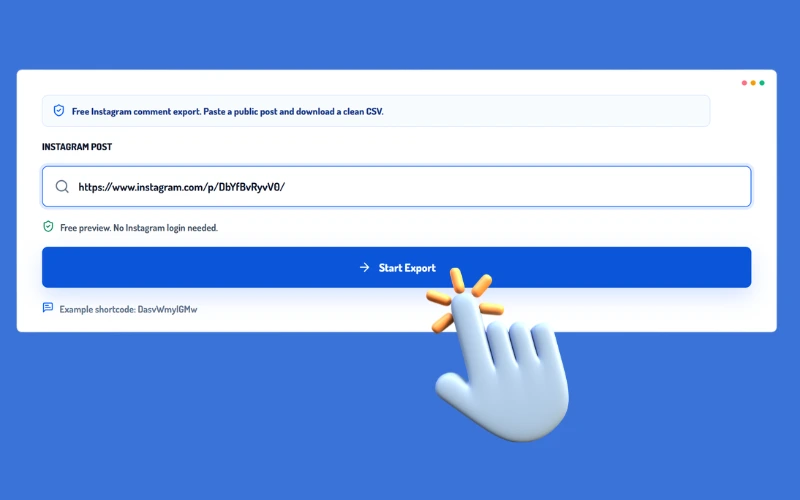 2
2Click Start to retrieve and organize the public comment list. No Instagram login is required.
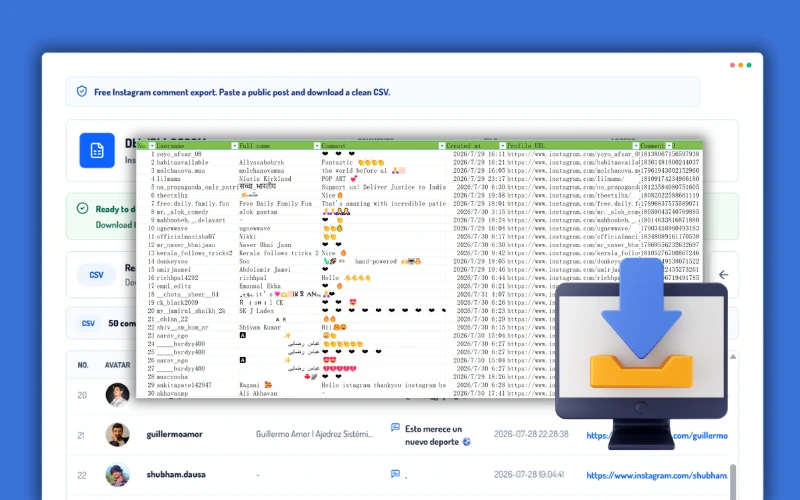 3
3Review up to 50 comments, then download the complete comment list to your device as a clean CSV.
Instagram Comment Exporter keeps public comment data private, structured, and ready for analysis, reporting, or outreach.
Collect public comments without logging in to Instagram or sharing account credentials. Personal and client accounts stay outside the export workflow.
Paste a public Post or Reel URL, or enter its shortcode, to turn comments into a structured list without manual copying.
Keep every available comment connected to the commenter's avatar, username, full name, timestamp, and public profile URL.
Download the complete available comment list as an Excel or CSV file for filtering, analysis, CRM import, and campaign reporting.
Process multiple Instagram Post and Reel links in batches to manage campaign, creator, community, and competitor research more efficiently.
Marketers, agencies, creators, and growth teams can apply the same data to lead research, audience analysis, campaign measurement, community management, creator discovery, and client reporting.
Compare comment limits, export formats, privacy, batch processing, and research workflows before choosing an Instagram comment exporter.
| Comparison | LinkedRadar | DolphinRadar | Manual Export |
|---|---|---|---|
| Supported content | Posts, Reels, photos, and carousels | Posts, Reels, photos, and carousels | Any manually accessible content |
| Accepted input | Instagram URL or shortcode | Instagram URL or username | Open each post individually |
| Account required | No account or Instagram login | No account or Instagram login | Instagram may require login |
| Free preview | Up to 50 comments | Up to 15 comments per post | Manual scrolling only |
| Free download | Up to 50 comments without login | Not available | No native download |
| Paid upgrade for export | Not required | Required | No subscription |
| Complete comment export | Complete available comment list | Unlimited loading on paid plans | Unreliable for large posts |
| Export formats | Excel and CSV | Excel; CSV not publicly listed | Manual copy and paste |
| Exported fields | Avatar, username, full name, comment, time, profile URL | Username, comment, time, like count | Only manually copied fields |
| Batch processing | Multiple Post and Reel links | No multi-link batch export stated | One post at a time |
| Privacy | Private and anonymous | Account required for downloads | Connected to the active session |
| Data preparation | Structured and ready to analyze | Structured Excel export | Requires manual cleanup |
| Comment analysis | Ready for Excel, Sheets, CRM, or reporting tools | Built-in AI sentiment and account insights | No automated analysis |
| Time required | Fast, automated retrieval | Fast automated viewing | Slow and repetitive |
Instagram Comment Exporter turns public Post and Reel comments into structured data for research, reporting, and growth workflows.
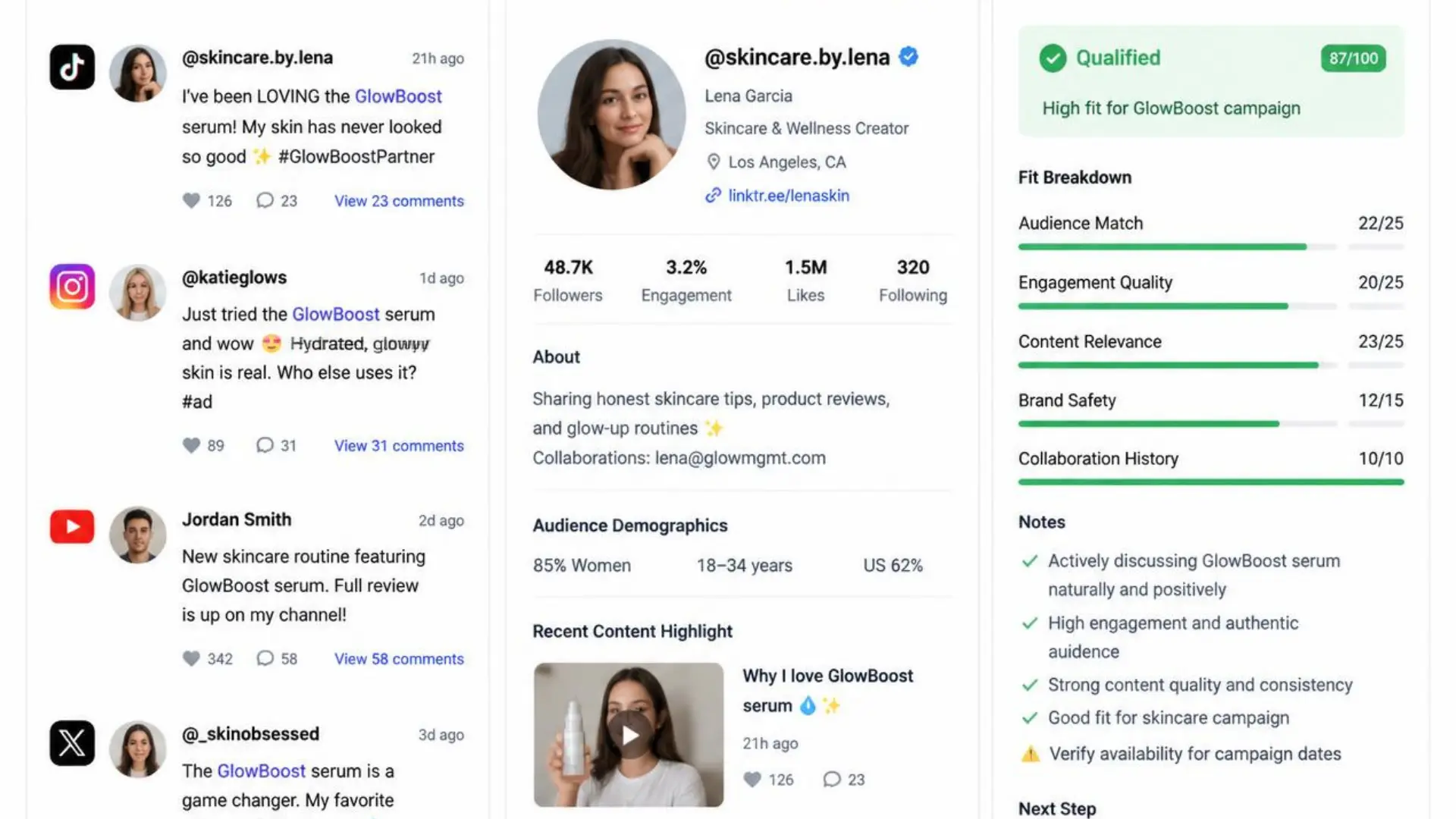
Find people already discussing relevant products, creators, or campaigns. Review their comments and public profile details before qualification or outreach.
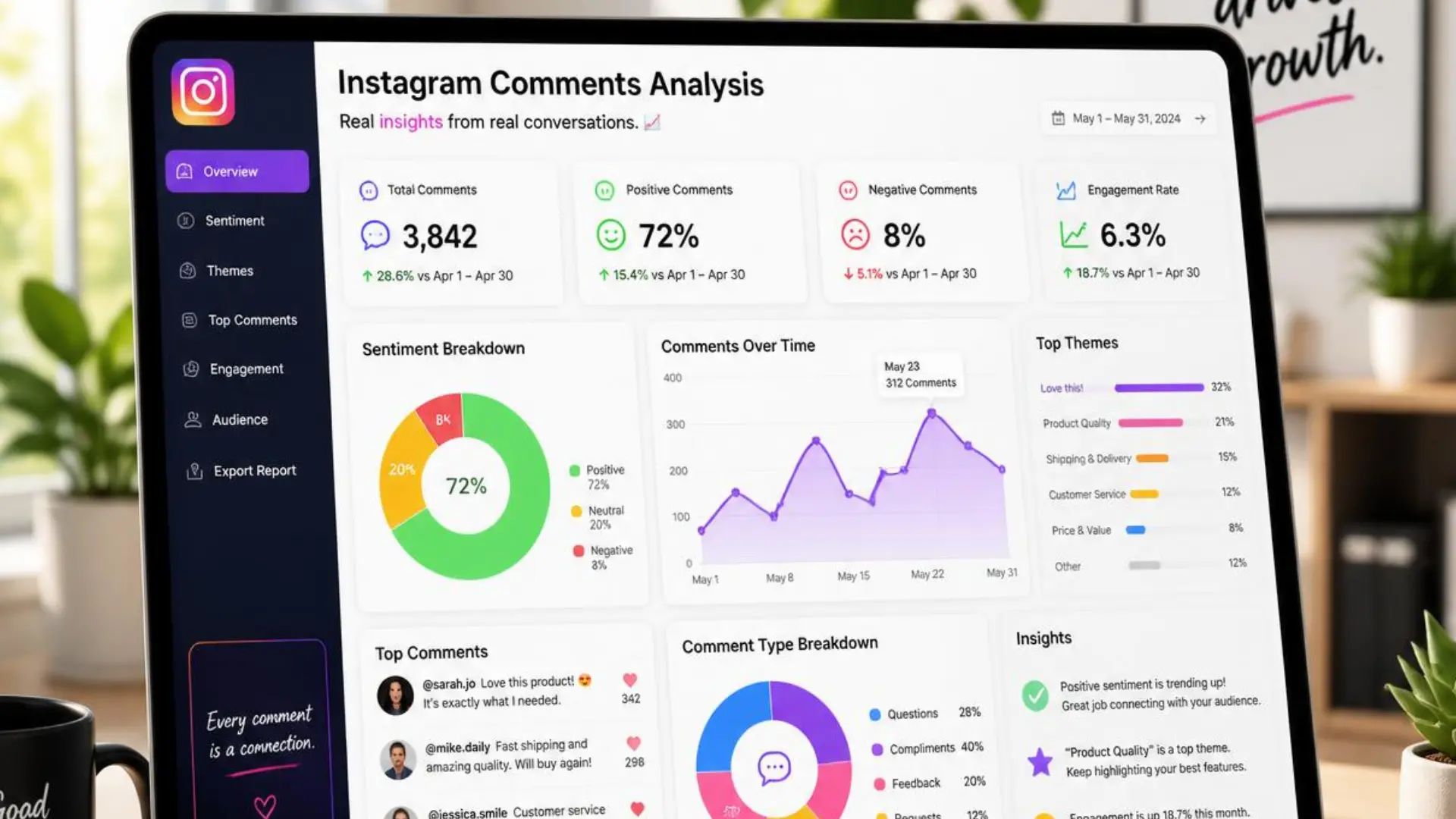
Compare comments across campaign Posts and Reels to identify recurring questions, objections, audience language, and purchase-intent signals.
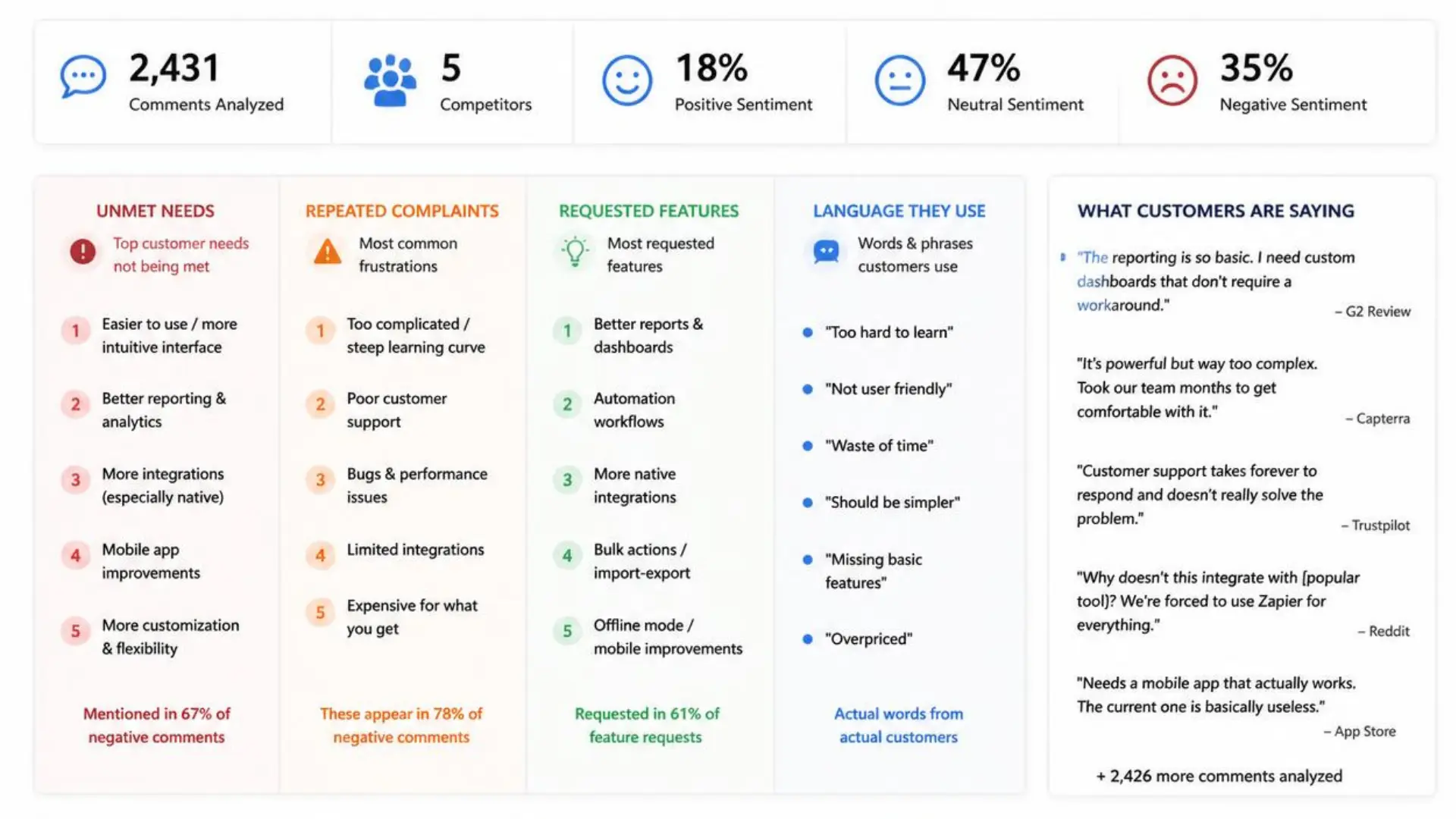
Analyze public competitor comments to uncover unmet needs, repeated complaints, requested features, and the language customers actually use.
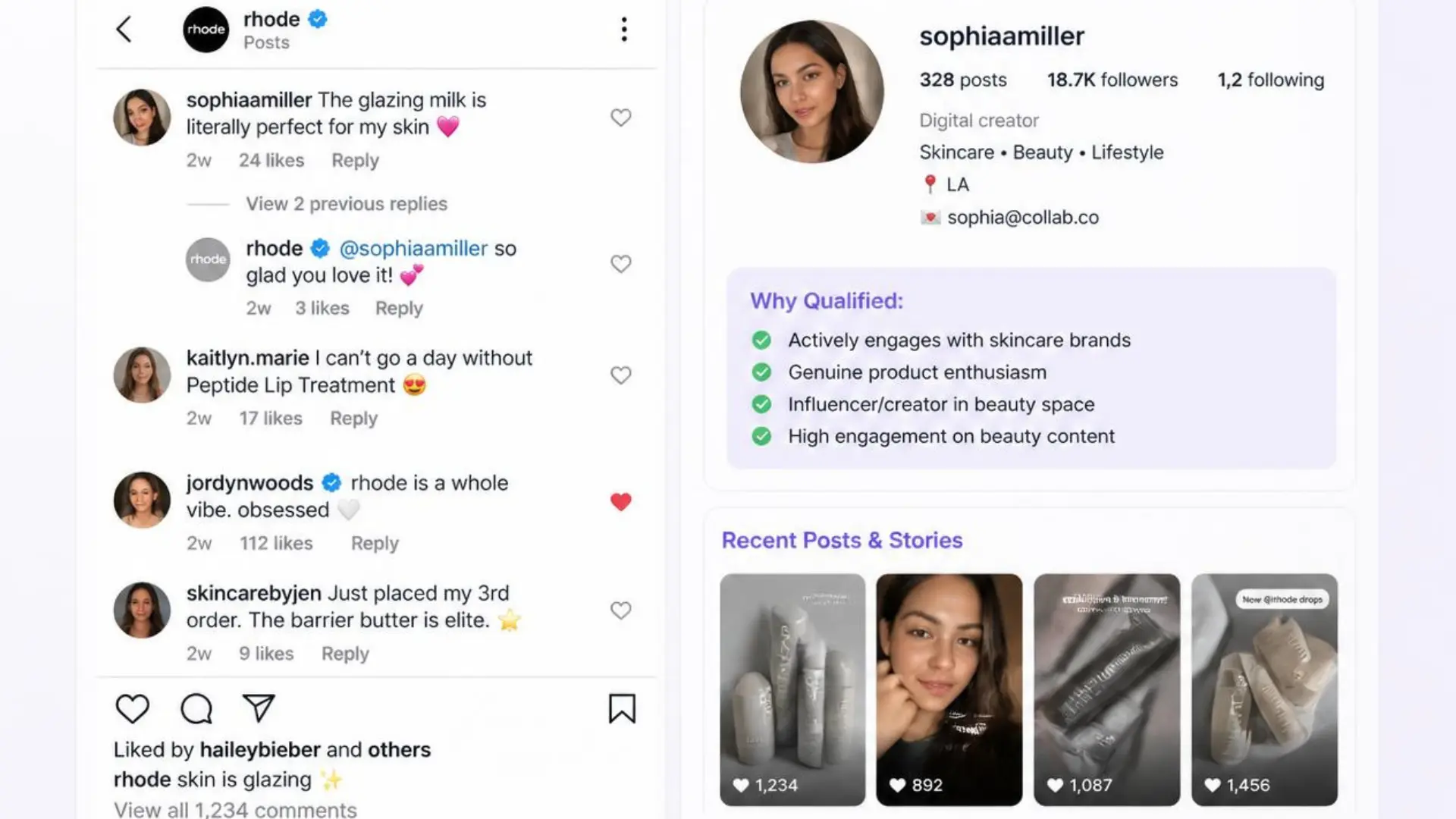
Build shortlists of active niche participants using commenter usernames, full names, comment context, and direct Instagram profile URLs.
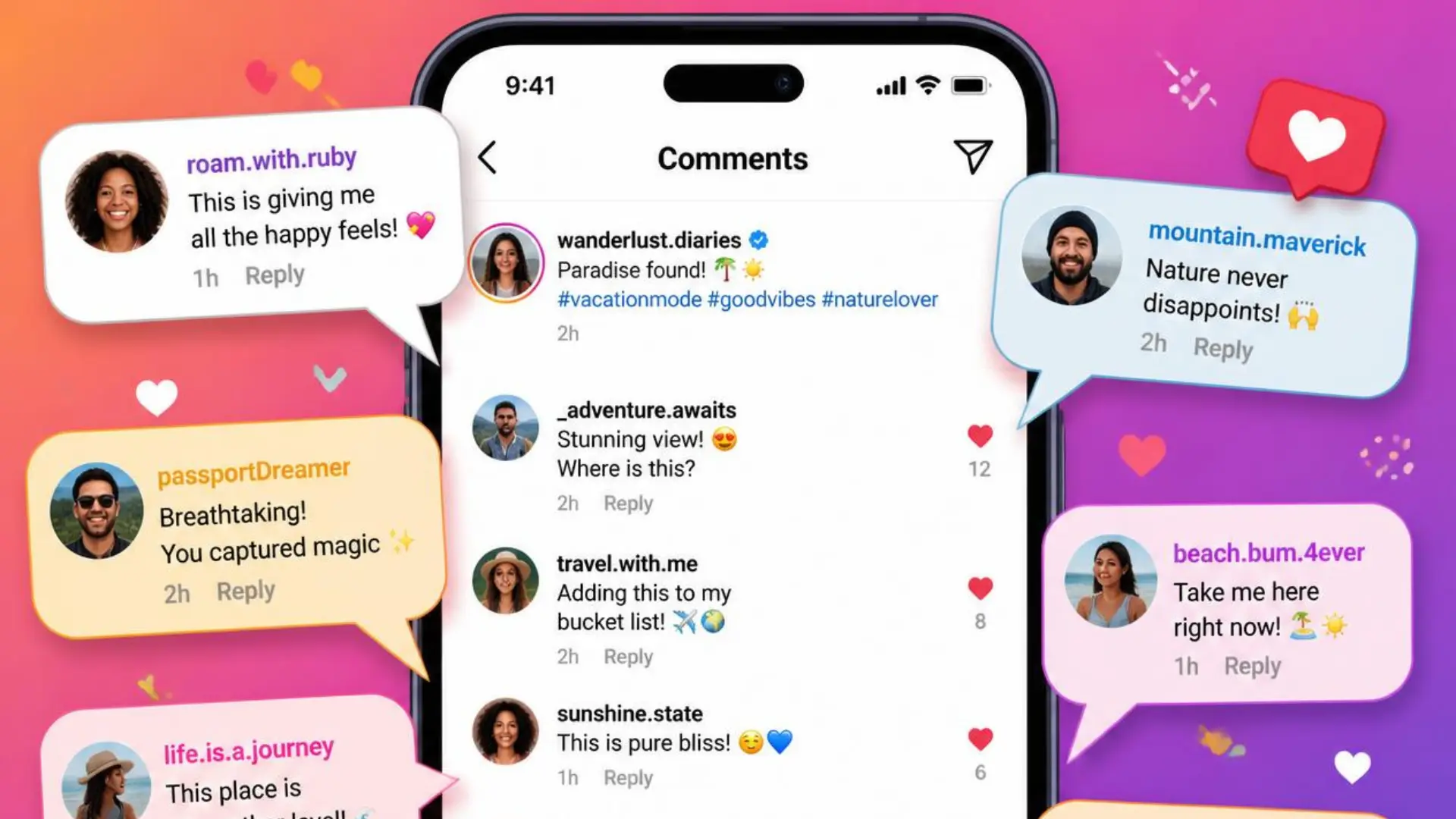
Preserve community questions, feedback, and recurring discussion topics for content planning, moderation, and deeper audience research.
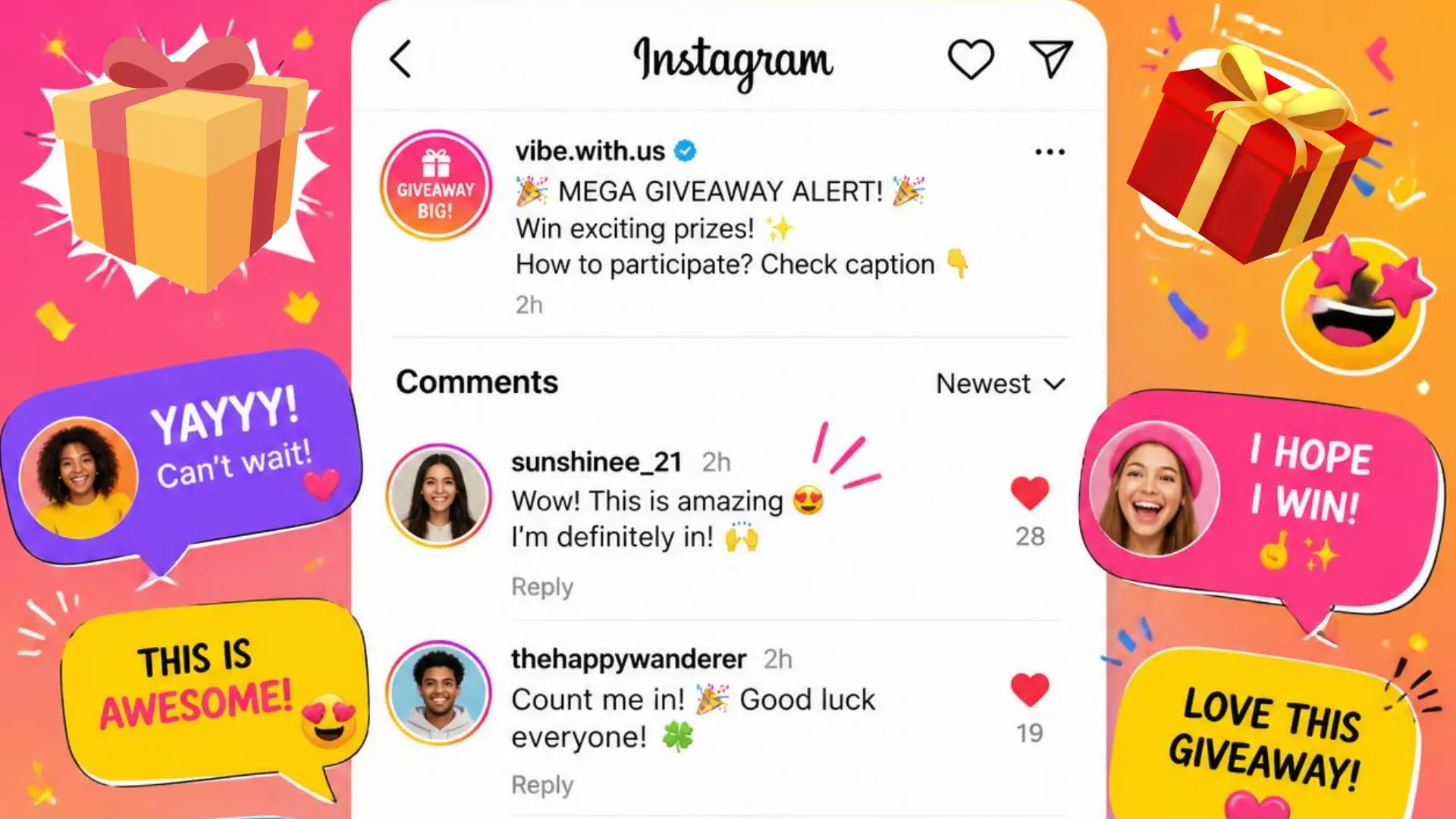
Export public contest comments for entry verification, duplicate review, eligibility checks, and a transparent record of participation.
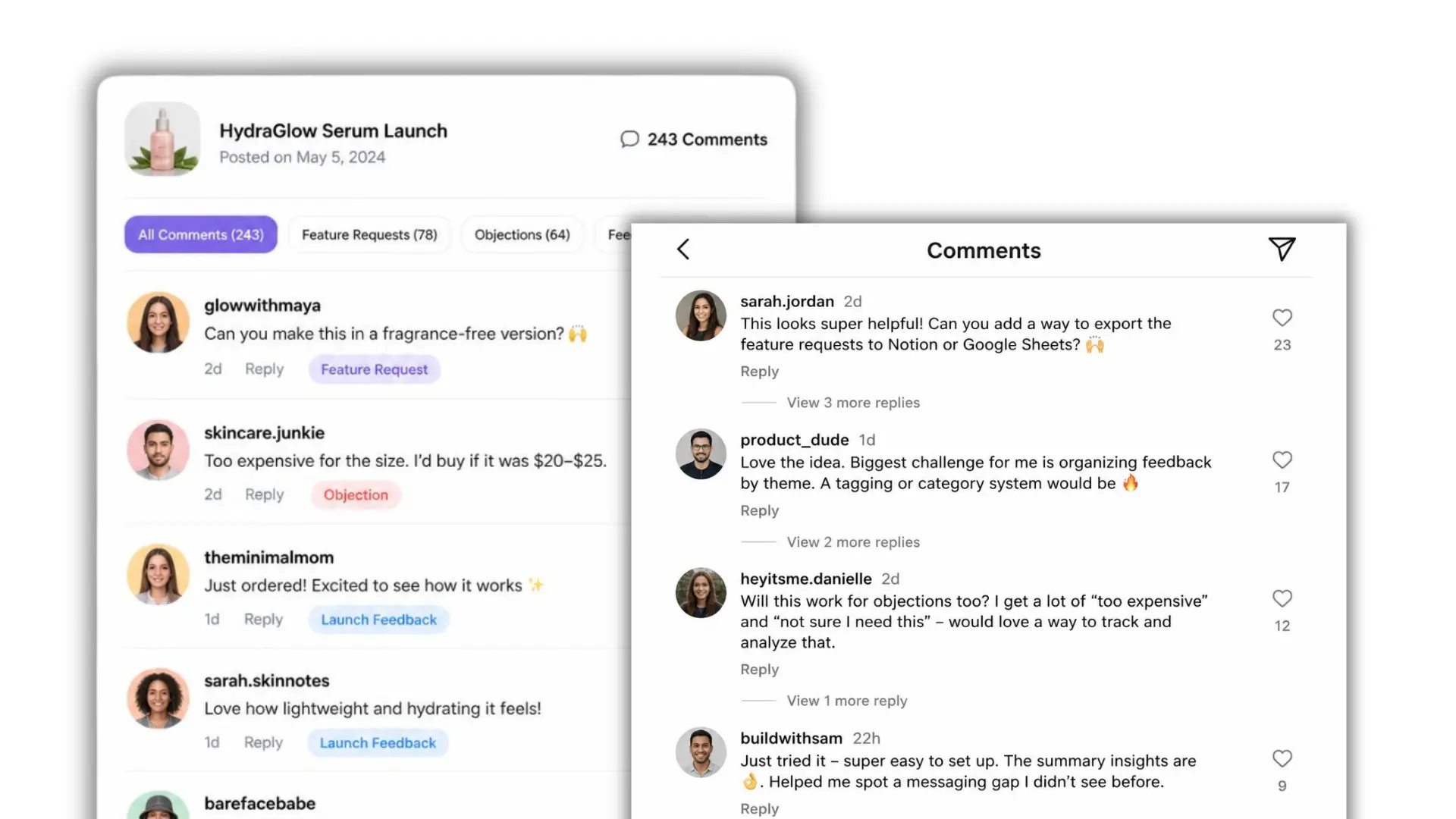
Collect feature requests, customer objections, launch feedback, and real audience wording to guide product and messaging decisions.
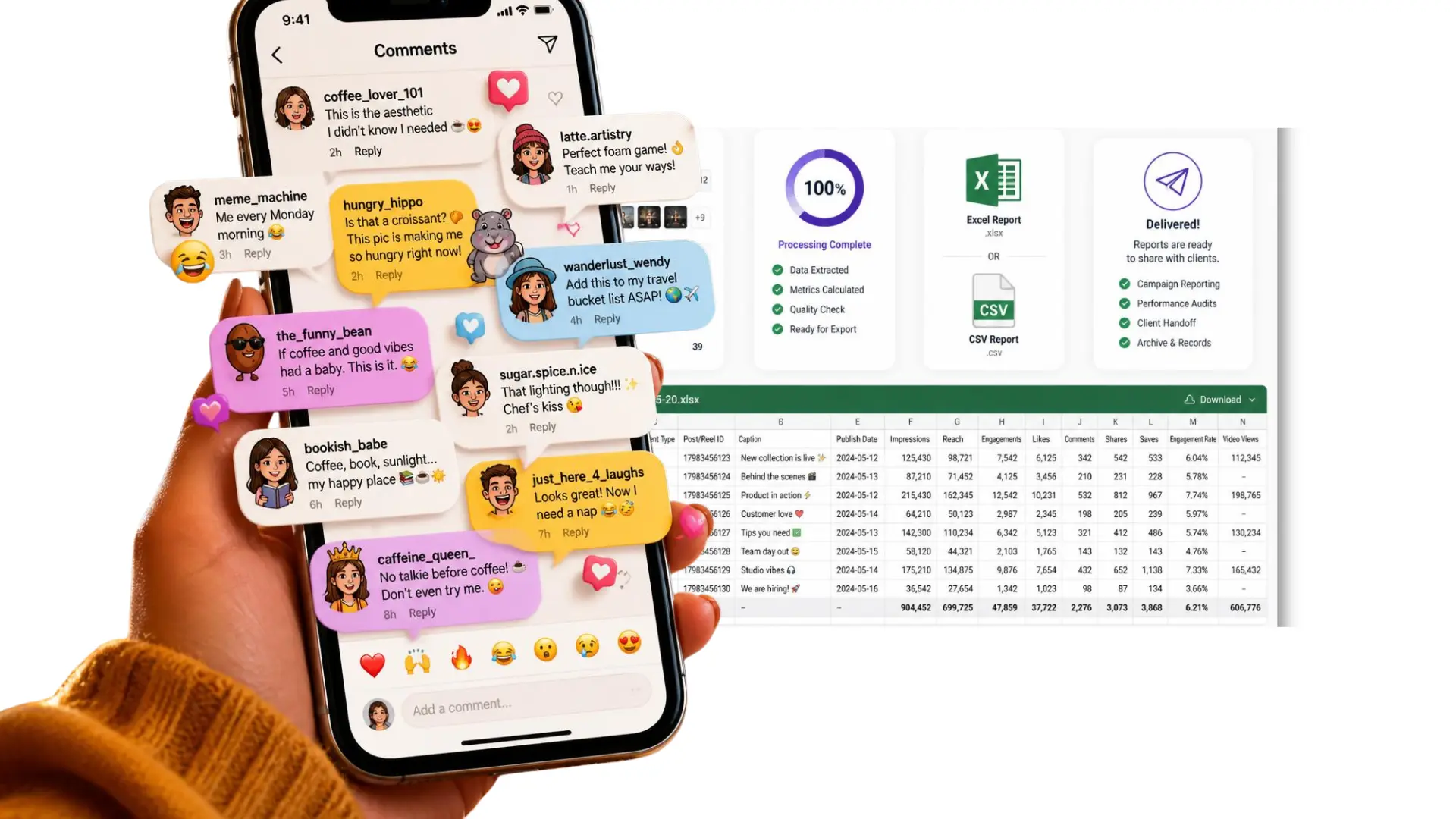
Batch-process multiple client Posts and Reels, then deliver consistent Excel or CSV files for campaign reporting, audits, and client handoff.
Feedback from marketers, agencies, and creators using LinkedRadar's Instagram Comment Exporter.
We can preview 50 comments, download the CSV, and start segmenting campaign responses in Excel right away. That removes a lot of manual cleanup.
 Ava R.Growth Marketing Lead
No Instagram login is a big win for agency work. We can review client Posts and Reels without mixing research with personal accounts.
 Ben H.Agency Strategist
Keeping each comment beside the username and profile URL makes creator screening much cleaner. The context is already there when we qualify people.
 Mira K.Creator Partnerships
Build a wider social research workflow with audience, profile, and lead discovery tools from LinkedRadar.
Clear answers about supported content, free access, comment limits, and Excel or CSV exports.
An Instagram Comment Exporter collects publicly available comments and organizes them into a structured Excel or CSV file.
LinkedRadar supports public Posts, Reels, single-photo posts, and carousel posts.
Yes. Instagram Comment Exporter accepts either the complete Instagram URL or the media shortcode.
No. LinkedRadar's Instagram Comment Exporter does not request an Instagram account, password, or session cookies.
Yes. It is currently free to use, with up to 50 comments available for preview and download without signing in.
Yes. LinkedRadar supports the complete available comment list from the selected public Post or Reel.
Each row can include the avatar, username, full name, comment text, creation time, and public profile URL.
Yes. Both Excel and CSV formats are available for local download, filtering, and analysis.
Yes. Batch processing supports multiple public Post and Reel links in the same research task.
The data supports campaign analysis, lead research, creator screening, giveaway review, agency reporting, and CRM preparation.
Use the Instagram Comment Exporter & Scraper to turn public post replies into a clean CSV in minutes.
Free Instagram Comment Exporter & Scraper
Download Every Comment in One Clean CSV
Paste any public Instagram post or Reel into Instagram comment downloader. Get the complete comment list in a clean CSV.